


Part 1: data frames (extra powerful dictionaries) - SOLVED
Contents
Part 1: data frames (extra powerful dictionaries) - SOLVED#
This workbook does not require you to load any datasets.
We will need to import both pandas and numpy by running the cell below:
import pandas as pd
import numpy as np
Before we analyse this spreadsheet let us dig in a bit more into Data Frames.
Let us create a simple dictionary first:
gradebook = {}

gradebook["Student id"] = ["UP123", "UP124", "UP125", "UP126"]
gradebook["Marks (out of 10)"] = ["10", "5", "7", "6"]
#display the gradebook

gradebook
{'Student id': ['UP123', 'UP124', 'UP125', 'UP126'],
 'Marks (out of 10)': ['10', '5', '7', '6']}
Now, let’s create a Data Frame that holds the same information, but it is much more flexible than a dictionary in terms of functionality:
df_gradebook = pd.DataFrame()

df_gradebook["Student id"] = ["UP123", "UP124", "UP125", "UP126"]
df_gradebook["Marks (out of 10)"] = ["10", "5", "7", "6"]
# Display the gradebook

df_gradebook
| Student id | Marks (out of 10) | |
|---|---|---|
| 0 | UP123 | 10 |
| 1 | UP124 | 5 |
| 2 | UP125 | 7 |
| 3 | UP126 | 6 |
Even though we have used lists to construct the Data Frame columns they are flexible to use. The columns were converted to pandas Series: the pandas Series uses numpy arrays, but adds extra functionality!
type(df_gradebook["Student id"])
pandas.core.series.Series
To print a single column of the data frame we use:
print(df_gradebook["Marks (out of 10)"])
0    10
1     5
2     7
3     6
Name: Marks (out of 10), dtype: object
Exercise 1.1#
Create a simple Data Frame that represents the following spreadsheet:
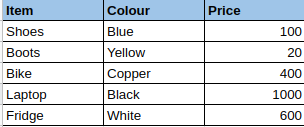
#make the empty data frame
my_data_frame = pd.DataFrame()

#add the data
my_data_frame["Item"] = ["Shoes", "Boots", "Bike", "Laptop", "Fridge"]
my_data_frame["Colour"] = ["Blue", "Yellow", "Copper", "Black", "White"]
my_data_frame["Price"] = [120,20,400,1000,600]

my_data_frame
| Item | Colour | Price | |
|---|---|---|---|
| 0 | Shoes | Blue | 120 |
| 1 | Boots | Yellow | 20 |
| 2 | Bike | Copper | 400 |
| 3 | Laptop | Black | 1000 |
| 4 | Fridge | White | 600 |
Print each of the columns of this Data Frame.
my_data_frame["Item"]
0     Shoes
1     Boots
2      Bike
3    Laptop
4    Fridge
Name: Item, dtype: object
my_data_frame["Colour"]
0      Blue
1    Yellow
2    Copper
3     Black
4     White
Name: Colour, dtype: object
my_data_frame["Price"]
0     120
1      20
2     400
3    1000
4     600
Name: Price, dtype: int64