


How to write your own function
Contents
How to write your own function#
We’ve now seen how to “call” a function, but we’re going to need to be able to write our own functions to do new things. So lets learn how to write our own function in python. Most of the coursework questions will be “Write a function to do [SOMETHING], it’s therefore crucial to know this bit
First, let’s see an image: the syntax of functions in python looks like:
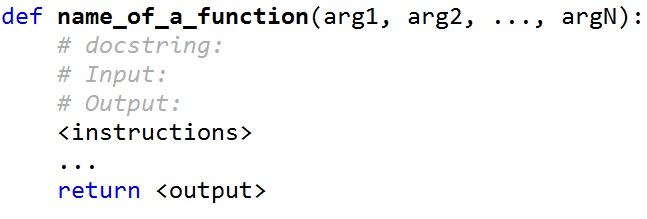
Just under the def statement, we can put a string which documents the function.
Then the body of the function does all the calculations, using the values in the argument variables. At the end, we have a return statement, which determines what the function outputs.
Now, let’s see an example of this in code. This function takes one input value and returns that value squared.
def square(x):
    """Squares a number"""
    y = x*x
    return y
print("4 squared is equal to ", square(4)) # Note that "square(4)" is "calling" our function
4 squared is equal to 16
# You can run this cell for help on the square function.
# It's just the function name followed by a ? ... This works for all functions, but you need to have written
# the docstring for it to be useful!
square?
Don’t forget the return!#
The return statement is the only thing that is returned by the function. Anything else computed within the function is lost. So for example if you did:
def square(x):
    """Squares a number"""
    y = x*x
This will not do anything. The variable y is not accessible outside of the function and is lost, and we never return the square. So we will never know what 4*4 is :(
Similarly, doing:
def square(x):
    """Squares a number"""
    y = x*x
    print(y)
Is in almost all cases not what you want to do. While this will print the value of y to the screen, the computer will not know the value of y outside of the function.
So we might want to assign the value of 3**2 to a new variable using this function doing:
def square(x):
    """Squares a number"""
    y = x*x
    print(y)

three_squared = square(3)
print(f"The value of three squared is {three_squared}")
9
The value of three squared is None
This doesn’t work! We need to use the return statement correctly to get what we want.
def square(x):
    """Squares a number"""
    y = x*x
    return y

three_squared = square(3)
print(f"The value of three squared is {three_squared}")
The value of three squared is 9
Return versus Print#
return
\(\verb|return|\) has a meaning only inside a function.
Only one \(\verb|return|\) can be executed inside the function.
the code that is inside the function but it is placed after the \(\verb|return|\) statement is not executed.
\(\verb|return|\) has a value associated with it, given to a function caller.
print
\(\verb|print|\) can be used outside functions.
Multiple \(\verb|print|\) statements can be executed inside the function.
The code inside function can be executed after the \(\verb|print|\) statement
\(\verb|print|\) has a value associated with it, outputted to the console.