


Conditional statements
Contents
Conditional statements#
Binary decision (if XX do YY else do ZZ) diagrams#
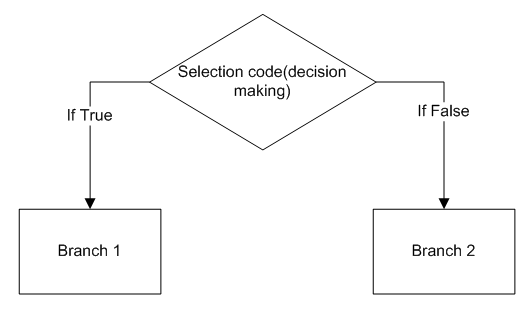
In code you often need to make a decision. Do I want to do “thing YY” or should I do “thing ZZ”. In the case that there are two choices, this is a “binary decision”. More complex logic branches are possible, and we refer to these as “branching statements”.
The simplest branching statement is a conditional:
- A test that evaluates the logical value of the expression.
- Code to be executed if the test is true (Branch 1).
- Code to be executed if the test is false (Branch 2)
Conditionals - If, elif and else (General Structure)#
In python conditional statements (including ones with more than two branches) can be written using if elif and else. As with functions, these will require us to correctly indent our code. Indentation is crucial in writing and reading python. Things within the conditional will be indented with respect to those outside. If we want a conditional within a conditional (an if statement within an if statement) we indent a second layer. Perhaps, as with most things in python, this is easier demonstrated. First with a diagram:
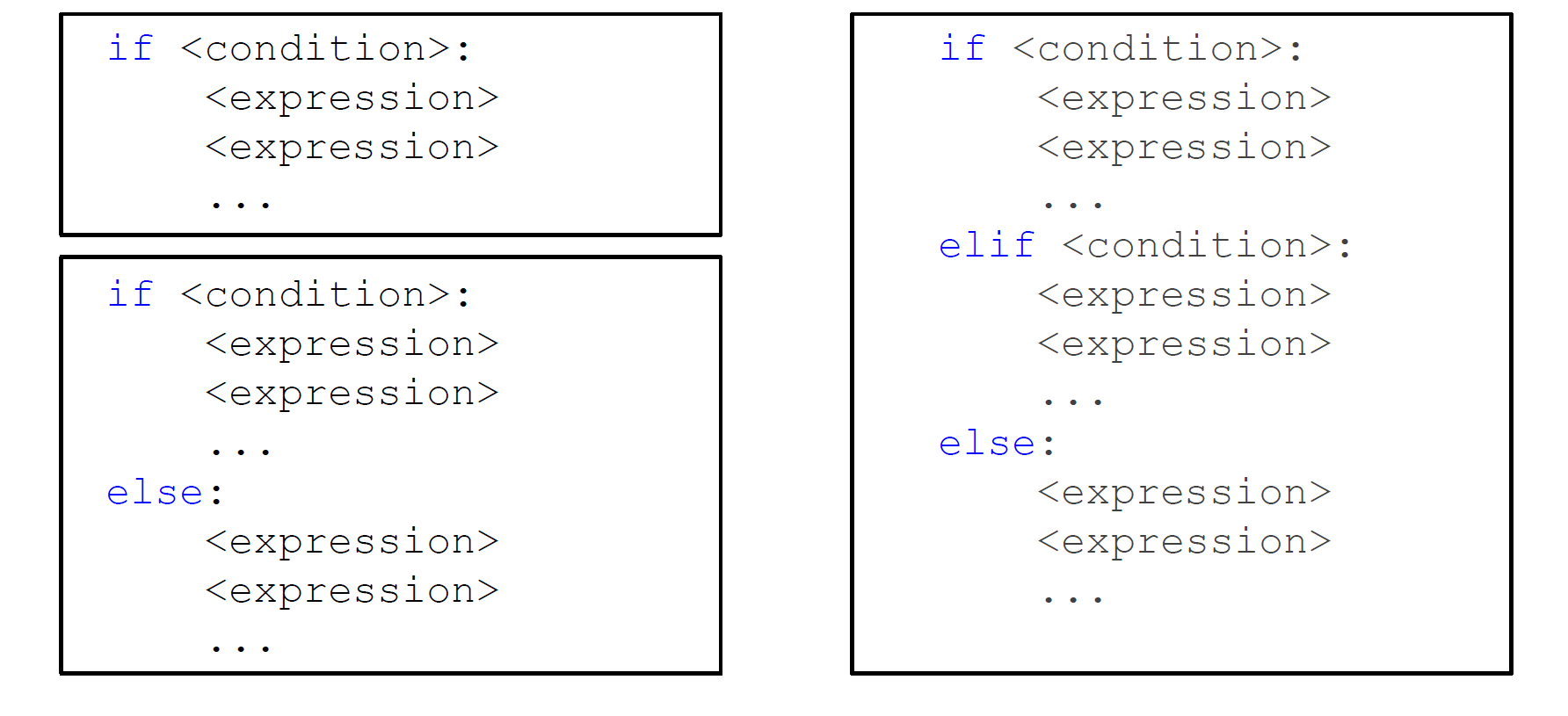
Then with some code
my_number = 4  # You can change this number around and run this cell to test other possibilities

if my_number%2 == 0:
    print("Cool, your number is even")  # If condition is True, do this. Note the indentation.
else:  # Else statement is *not* indented.
    print("I'm afraid your number is odd")  # If condition is False, do this. Also indented
Cool, your number is even
Some observations on this:
The expression
if my_number%2 == 0evaluates toTrueif our inputmy_numberis even.Here
==is used for comparison, once again make sure that you don’t confuse it with the assignment operator=The indentation is important! Each intended set of expressions stands for a block (branch) of instructions.
Now we can make this an example with some more branches. Feel free to run the cell below after choosing a range of different values for my_num. This now has 3 logical branches:
The number is less than 5
The number is less than 10, but not less than 5
The number is not less than 10
(You could say reword this, to say things like “the number is greater than or equal to 10”, but the words above are directly what the computer will test)
my_num = 4

if my_num < 5:
    print("My number is less than 5")
elif my_num < 10:
    print("My number is less than 10 but greater or equal to 5")
else:
    print("My number has to be greater or equal to 10")
My number is less than 5
We can use the elif statement multiple times to add more branches. This example has 5 branches:
my_num = 4

if my_num < 5:
    print("My number is less than 5")
elif my_num < 7:
    print("My number is less than 7 but greater or equal to 5")
elif my_num < 8.5:
    print("My number is less than 8.5 but greater or equal to 7")
elif my_num < 10:
    print("My number is less than 10 but greater or equal to 8.5")
else:
    print("My number has to be greater or equal to 10")
My number is less than 5
Nested conditionals#
Finally, let’s look at if statements within if statements …. This is where indentation really helps python to be readable. Nested conditionals can sometimes be easier to read than unnested statements, and are sometimes quicker to evaluate. Let’s illustrate:
x = -5.2  # Again, feel free to change this number and run the cell again.

if x>0:
    if x<=10:
        print('Your input is less than or equal to 10')
    else:
        print('Your input is greater than 10')
else:
    if x>-10:
        print('your input is negative and it is greater than -10')
    else:
        print('your input is less or equal to -10')
your input is negative and it is greater than -10
Is it clear what’s going on here? How will the code walk through all of this? If it’s not clear ask one of us and let’s walk through it together!
The next section will also take us through some examples at writing and using conditionals.