


Introduction
Introduction#
It’s normal. You’ve just finished writing that new bit of code. You’re certain that you’ve done it right, but when you run it, it fails or doesn’t give the right output. What can you do to try to get the code working again? Here are some steps that can normally be used to try to identify, and fix, the problem:
Step 1: Look at the error message. When a failure happens python will print an error message, and indicate at what line in the code that error occurs. Look at the error message, look at the indicated line of code. What might be happening here to produce the error that you are seeing?
Step 2: Add debug statements to the code (e.g. add print statements to monitor what the code is doing at every line). What should be happening at each line, and is the code doing what you think it should be doing?
Step 2A: To assist with this you can use python’s PDB debugger, as we will demonstrate below.
Here is a really good diagram (from pythonforbiologists.com) describing a bunch of the most common python errors (e.g SyntaxErrors and where to look to fix them), and some of the processes by which you might debug the code.
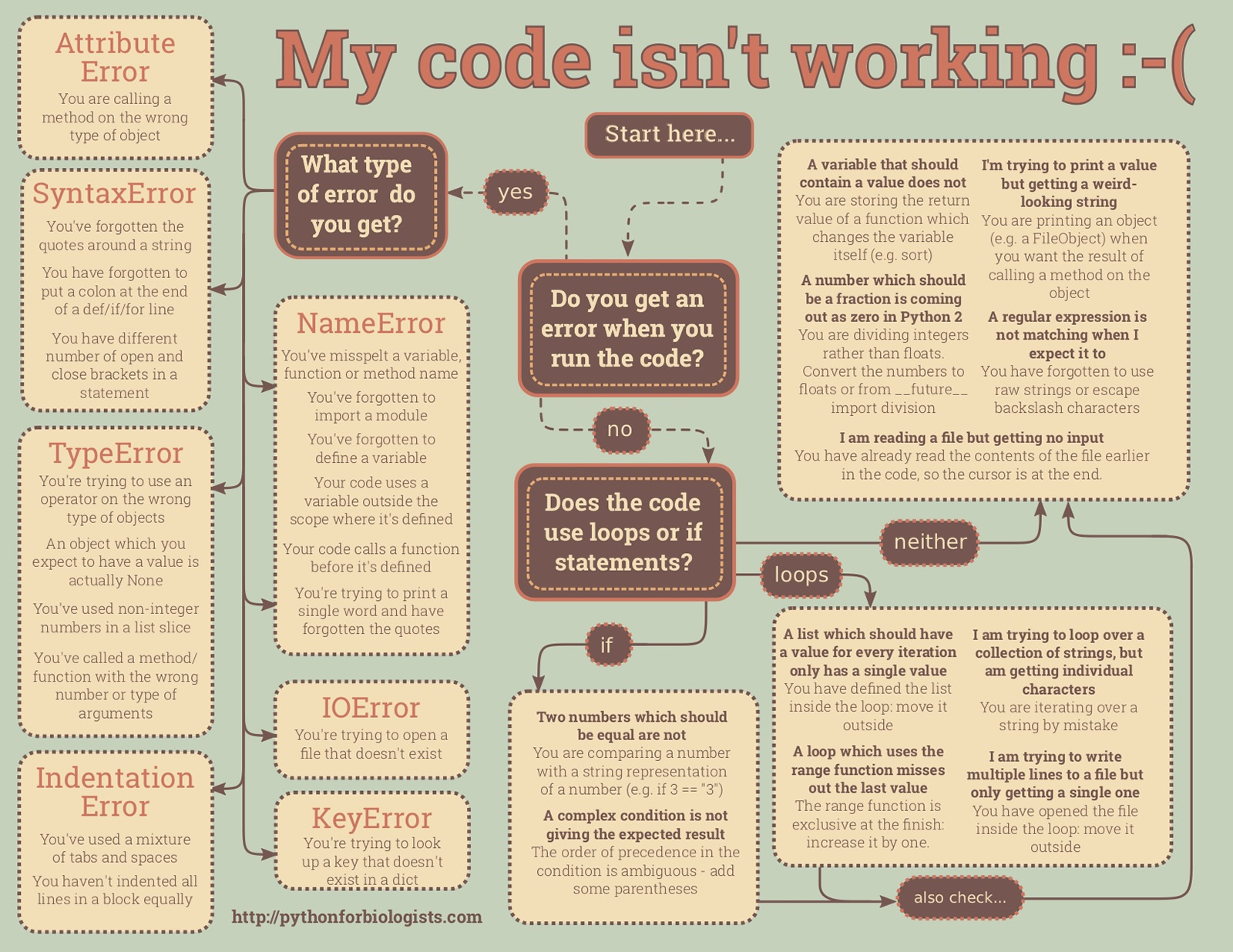
and also another resource with a bit more detail
https://runestone.academy/runestone/books/published/fopp/Debugging/toctree.html
We will explore some examples of debugging python code in today’s class, demonstrate the use of some tools like PDB, and try to give you more confidence in understanding and fixing problems that will always arise in your code.
WARNING This is a lecture in debugging, so all errors I made while putting this content together have been deliberately left in the code .. Enjoy!